Structural monitoring system
Project details
1. Introduction
1.1. Description of the problem and historical contextualization
This project first made its way into my head at the beginning of 2019, following the collapse of the Polcevera Viaduct in Genoa the previous year. There was a loud cry of scandal regarding the lack of maintenance and non-functioning of the monitoring system installed on the bridge which was at risk of collapse. My idea, in my own small way, was therefore to try (even simply with the aim of trying my hand at something new) to implement a low-cost system, usable by both public and private bodies, which would allow us to make up for these shortcomings: constant monitoring, triggering alarms, and managing maintenance interventions.
At the time, I developed a very rudimentary version of what is the project described in this arcticle. It was a simple web application that provided the central functionality:
- Real-time visualization
- Viewing historical data
- Maintenance management
The limitations, however, were different: you could manage a single predefined controller; the sensors, their quantity, and their values were hard-coded. Also, there was no user management of the system. This system was therefore a good basis, but it remained unusable in a real context.
1.2 Project objectives
I have set some main objectives regarding the project:
- Division into organizations of competence, and assignment of both users and clients to them. So each entity, organization and company can manage all the clients under its competence.
- Allow the use of different clients, easily addable.
- Always keep track of events.
1.3. Production process
The production process of the application was carried out in compliance, albeit not too rigorously, with the canons of software engineering.
Starting from an idea, I tried to identify myself with a possible customer, to imagine their needs and try to identify the requirements in the best possible way.
So I developed a list of functions, starting from the basics.
I moved on to drawing low-level mockups to imagine the structure of the pages and the main elements that made them up.
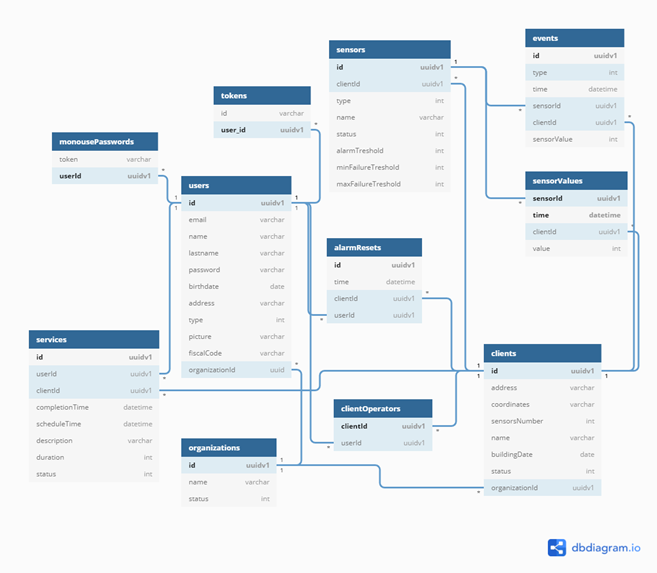
The next step was to then design the relational databases of the server and the client. At first in paper form, then with the help of the dbdiagram.io tool.
Then I moved on to the realization of the skeleton of the web application, which included the login mechanism and the system for maintaining and managing HTTP sessions.
I then proceeded to implement the features gradually, adding pages (at the beginning reduced to a minimum of content) and extending the database according to the project.
All this proceeds hand in hand on client and server.
In conceiving and imagining the steps that data take and the ways in which the different components act in different situations, I used large quantities of diagrams, flowcharts and bulleted lists, mostly made simply in pencil on paper.
2. PACT Analysis
I think it is useful to propose a brief and concise PACT (People, Activities, Context, Technology) analysis in order to better elucidate the structure of the application created.
2.1 People
Below is a description of the people who can use the system.
- Administrator: is an active user of the system, and his job is to manage and supervise a given organization. It can then add and remove operators, pair new clients, and remove them. What mainly differentiates the administrator from the operator, excluding access to management functions, is the scope within the system. This is because the administrator role is defined at the organization level. It will be able to act on clients, operators, and data relating to its own organization. An operator, on the other hand, will only have access to the data of the clients that are assigned to it. In a real context, the administrator would represent a work figure who resides in an office, and who supervises the system in a centralized way, without having to go to the place where the different clients reside.
- Operator: this is the user who uses the system to act directly on the monitored structures. One operator can take care of several facilities. Its role is to intervene in the event of anomalies or when there is a need to carry out scheduled maintenance. The operator also has the ability to reset any anomalies in the system on site, once an inspection has been carried out and the real criticality of the situation has been checked, ruling out an immediate danger. Maintenance interventions are also "signed" by an operator, who therefore takes charge and assumes responsibility for viewing the situation in which a certain structure lies under his responsibility. The operator will also be the user who can request a one-time access password in order to physically access the client and reset the anomalies. Of course, this event is also logged in the system. The operator, from a professional point of view, will be someone who has engineering notions and skills in the field of civil / construction construction.
- User of the facility (indirect usufructuary): Although the users of a monitored facility do not have access to the system, they also play a role as users in the system in their own way, and benefit from the functionalities provided by it. A possible interaction (which we hope will never be necessary) could be to respond to an alarm triggered by the system, moving away in the event of a danger signal from the structure.
2.2 Activities
Complete lists of possible activities divided by users that can be carried out within the application:
Administrator:
- View all clients in your organization and their status.
- View all operators that belong to your organization, and therefore are under your control.
- Add and remove a client.
- View the maintenance schedule for all clients or for an individual client.
- Schedule maintenance.
- Associate a certain client to an operator, which will be under its responsibility.
- View reset events for a certain client.
- View all anomalous events for all clients or for a single client.
- View real-time data from a certain client.
- View data over a specified time frame.
Operator:
- View the clients under your responsibility.
- View real-time data from a given client.
- View the data history of a given client.
- View the anomaly event history of a given client.
- Complete a maintenance task.
- On-site or remote reset of an abnormal state.
2.3 Context
The context within which this application is inserted can branch out into at least two different sub-cases: the application on critical public structures (or in any case open to the public) and on private structures.
What could differentiate the two cases above all will be above all the hardware used and the intensity of the surveillance implemented.
In fact, it is presumable that in a public context the structure (which can be a bridge, for example) is subjected to much more important and assiduous stresses.
In the civil housing sector, on the other hand, it could be very advantageous from a redevelopment perspective but also from a new construction perspective, to integrate the application into a larger home automation system, providing security and added value to the property.
The application, thanks to the possibility of centralizing the monitoring of multiple structures, would make it possible to minimize human error due to forgetfulness, bureaucratic complexity or procrastination. You would always have your finger on the pulse of the situation, as well as the possibility of always having a reliable history of what the state of a certain structure is.
2.4. Technologies
I will explore the technologies used in a more technical way in the paragraph dedicated to them.
In general, the structure is that of a centralized web application, to which low-level controllers are attached that obtain data from the sensors.
It will therefore be necessary to have a very fast server, capable of handling large amounts of data in an extremely responsive way.
On-site hardware must also meet requirements for high reliability and durability.
Another critical issue could be the quality of the connection between the clients and the server, especially if the location is in relatively remote places and not adequately covered by a cellular network connection.
3. Interface design
In this section, I report some considerations regarding the choice of the elements that make up the interface of the application.
MDBootstrap: this framework for creating modern web interfaces is the material design version of the popular Bootstrap framework created by Twitter. It retains all the advantages of the original version, namely:
- Layout clarity
- Chromatic continuity
- Relative space management
- Responsiveness
- Spreading speed
- Extensive documentation
- Very dynamic solutions to perform actions within a single page, such as Modal
All this, however, in a Material Design key, which I personally find fresher and more captivating than the original stylistic canon of Bootstrap.The use of the framework allows you to create a single version of the web interface, which can also be used from mobile devices. The use of the Material Design style also guarantees a natural stylistic continuity with a possible Android application. In the future, it could be considered to customize the shapes and colors of a framework such as bootstrap, in order to also create a sort of familiarity at a glance towards the user, a useful effect from a market perspective. In that case it would be useful to create a set of vector graphic elements such as logos, icons for buttons that follow the design principles of a good interface.
Datatables: this plugin allows you to create dynamic tables that directly implement on-the-fly search, row sorting, and auto-sizing. A very important feature is the one that allows you to load the entries of a table page using ajax. So in the case where there is a lot of data in the table (example: a long list of anomalies): only the data of the current page are loaded by means of an http request, thus maintaining acceptable data loading times on the page.
4. Features and technologies used in their implementation
This paragraph deals with providing a detailed technical explanation of which components have been used and chosen in the drafting of the code and more generally in the implementation of the various functions.
4.1. The Basis
Since the first rudimentary version, after an in-depth investigation, I opted to use JavaScript also on the server side and specifically using NodeJS. This choice was dictated by some characteristics of this now very popular framework:
- Use of a single language both on the client side (understood as web pages) and on the server side.
- Ability to use it on the central server application and on clients.
- Availability of a very large number of plugins that allow you to do practically anything you want within a NodeJS application.
- High scalability and ease of maintenance and code modification.
- Fast code writing.
- Native use of variables in JSON format.
The primary alternative to NodeJS was a Java application based on the Maven framework that performed the functionality of a web server using servlets. It turned out to be not as effective and suitable as NodeJS. The most difficult obstacle to overcome in the use of NodeJS was undoubtedly to understand and master the concept of Async Function and Promise, in order to always ensure the availability of data that required a longer computational time than other instructions that used them to be produced.
4.2 Web server and client server
Express: is the Node plugin that allows, through the implementation of a layer stack, to create a complete web server. It offers the possibility of inserting plugins (which I will talk about below) for any need. Rules are defined for intercepting certain HTTP paths, also based on the type of request. Express also allows the use of several plugins for generating dynamic web pages, including EJS, which I will talk about later. Another strength of Express is that it can create ad hoc filters on incoming HTTP requests, as I explain in detail in the next point.
HTTP request filtering: I implemented a filter that, by examining the path of the current HTTP request and comparing it with all the paths managed by the Express router, if it detects an invalid address (non-existent or belonging to another type of user) it refers to the home page of the type of user logged in at that moment. This, however, does not affect the paths of the API for communicating with clients, nor the pages that can be reached without authentication. In case there is no active session with a valid user (session managed automatically by the express-session module via cookie) you are redirected to login.
Passport-login and session management: A fundamental plugin in the creation of the web application is passport. It allows you to implement diversified login strategies according to your needs, all in a simple, secure and standardized way. In my case, I used only two strategies that work in synergy: the local login and the remember-me strategy.
The first takes care of receiving input credentials, validating or not validating the login and in the event of success setting the headers in the active session (created by Express) that maintain the identity of the logged in user. This allows you to always have the user's data at hand and to be sure whether or not he is logged in. The user, through two dedicated methods, is in fact serialized and deserialized within the session. The second, on the other hand, has the burden of ensuring the operation of a remember-me system, and therefore maintaining the user's access status even after prolonged inactivity (session expiration), browser closure, server restart, etc. The mechanism is based on the generation of disposable tokens, stored in the database, one per user. At the time of login, if the "remember me" option is selected, a token is generated that is saved both in a cookie (with a duration of your choice, usually a few days) returned in the response to the browser, and in the database. If no active session is found at the time of a request to access an area of the site that requires authentication, the passport-remember-me plugin checks if there is a token in the database that is the same as the one contained in the remember-me cookie. If it is, authentication is automatic, and the corresponding user is serialized in the session. Otherwise, you will be redirected to the login page, as no valid match was found.
Bcrypt and password hashing: to store the password securely I used a very popular hashing function: bcrypt. It allows you to specify the number of hashing iterations that are performed. Obviously the plaintext password from the POST login request is not stored.
4.3. Dynamic web pages
EJS: this is the plugin for rendering dynamic pages. Allows you to attach data when rendering the page in response to a request. An EJS file is very similar to a normal HTML page, except that it uses special tags that allow you to insert values passed by the server into the HTML tags or JavaScript code of the page. You can also use conditional constructs and loops to generate entire pieces of page differently based on the data passed by the server. The burden of this operation is entirely borne by the server that interprets the EJS file, translating it into an HTML page that is then forwarded to the browser that made the request. In Java, for example, the equivalent of EJS is JSP (Java Server Pages).
Ajax: is an extremely popular technique for updating fragments of a web page without reloading it completely. Ajax is integrated into the JQuery Javascript library.
Ajax forwards an "invisible" HTTP request to the server, which responds with the data needed to update a certain portion or component of a page. This helps to give enormous dynamism to the pages, also ensuring a better user experience, as well as savings in terms of time and "wasted" data.
4.4 Data visualization
Plot.ly: There are many plugins that allow you to visualize data in the form of graphs. However, I chose Plot.ly, since the first version of the application I chose Plot.ly. It allows you to customize the appearance of the chart, and includes useful tools to make navigation effective, such as: autoscale, zoom, ability to take a screenshot and simple and intuitive pan. In my case I have always used line graphs. In 2018, the free version for JavaScript had just been released. A very practical element is the possibility of providing Plot.ly with real-time data in JSON format, so that the flow of data from the client via sockets can be used in a trivial way. This technique obviously remains valid also for static use, i.e. to display the data corresponding to a certain period of time.
4.5. Database
PostgreSQL: As far as data storage is concerned, I decided to use a classic relational database, which suited my purposes perfectly. I chose a database I'm already familiar with: PostgreSQL.
Sequelize: This plugin for NodeJS turned out to be one of the biggest innovations I came across during the development of this project. It allows the use of a relational database within a Node application without writing even a line of SQL code. In fact, its purpose is to interface with the database simply by calling functions that take JSON objects (the options) as parameters and return the results of the queries themselves directly as JSON objects. You instantiate templates, which are JSON objects that contain all the features and information needed by Sequelize to generate the SQL code that is then executed on the database to create the tables. This very useful plugin allowed me not to get lost in the drafting of complex SQL queries that involved the concatenation of parameters and that are typically a source of typographical errors and difficult to identify and correct.
4.6 Communication between the server and clients
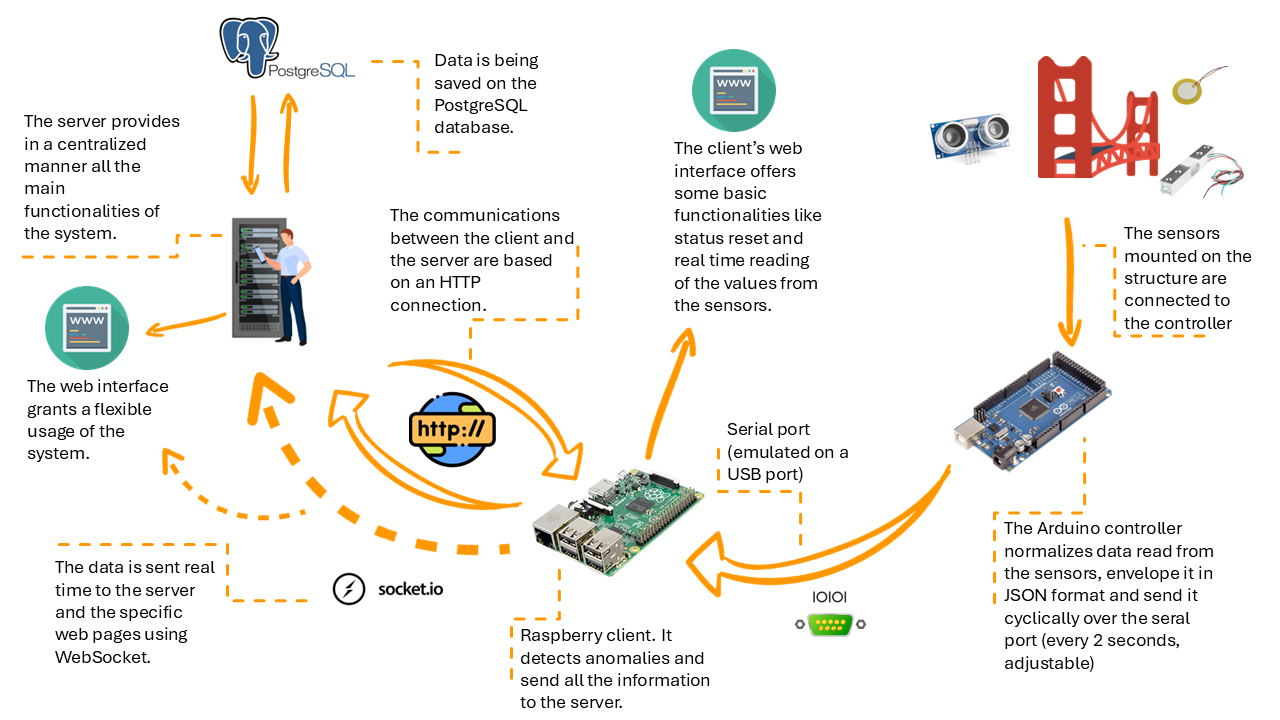
Data transmission on the fly, socket: the first type of communication between client and server is the one that involves sending data from the sensors connected to the client to the server, which then takes care of saving them in the database, after analyzing them. Since it was a continuous flow of data, classic http requests were unsuitable and too computationally expensive. The tool that best suits this need is the webSocket. In fact, it consists of a data transmission channel on which one or more clients can listen. When data is available, those who are listening can obtain and use it. The socket is bidirectional and has low latencies. It is also full duplex (a feature not exploited in this project).
I used a Node plugin that is an evolution of the standard WebSockets: Socket.io. More than an evolution, it is a superstructure that has normal WebSockets at its heart. In addition, it offers: opening a replacement HTTP connection in case of impossibility to use WebSockets (therefore reliability), integrity checking systems, buffering, automatic reconnection and the possibility of dividing listening clients into rooms (differentiating the information transmitted to the various rooms). Another practical example of use in the application is where web pages are dedicated to the real-time display of data from a certain client. They (their Javascript code) do not receive the data stream from the server (weighing it down unnecessarily), but directly from the client. From the server they only receive the address of the client to "tune in". In this way, the same data flow that goes from the client to the server, if necessary, also produces the graphs on the page.
Reliable communication, HTTP: beyond pure and simple data, the rest of the communications that take place between client and server, in both directions, need to be reliable. A practical example: the notification of an anomaly cannot be entrusted to a socket, as the client must be sure that the server has received it. With this purpose I have developed a series of HTTP APIs with which the server and the client perform all operations: from pairing, to reset, to anomaly notification, to event logging. Of course, HTTP requests are inherently reliable, and provide a successful or unsuccessful response to the component that forwards them.
4.7. Hardware
The Arduino controller: I chose probably one of the most popular and well-known controllers in the world. I chose it because of the extensive documentation, the familiarity I already had with this platform and its ease of use. Specifically, I used the MEGA2560 controller, which offers good performance. The Arduino code is derived from C. It consists mainly of two functions: one initialization and one loop. In the first one, the controller is initialized, and all the preliminary operations necessary for operation are carried out. In my case I initialize the communication PINs with the sensors and I set the serial port.
In the second, the actual operations are carried out, and it is repeated cyclically indefinitely. Here I read the values, package them in JSON format and send them on a serial port. The timing of this feature also determines how often the client sends data to the server. I set a timeout between one cycle and the next of 2 seconds. The libraries used are mainly 2: one specific to use load cells and ArduinoJSON to create JSON variables containing the names of the sensors with their values associated with them.
Sensors: the sensors used are of 3 types. Piezoelectric sensors, load cells and ultrasonic sensors. The former provide information about vibrations, the latter measure the forces acting at critical points and the third check deformations, displacements and misalignments. During the development of this application I chose these sensors and I interpreted their values in a completely empirical and profane way, obviously not possessing the necessary notions for a real evaluation.
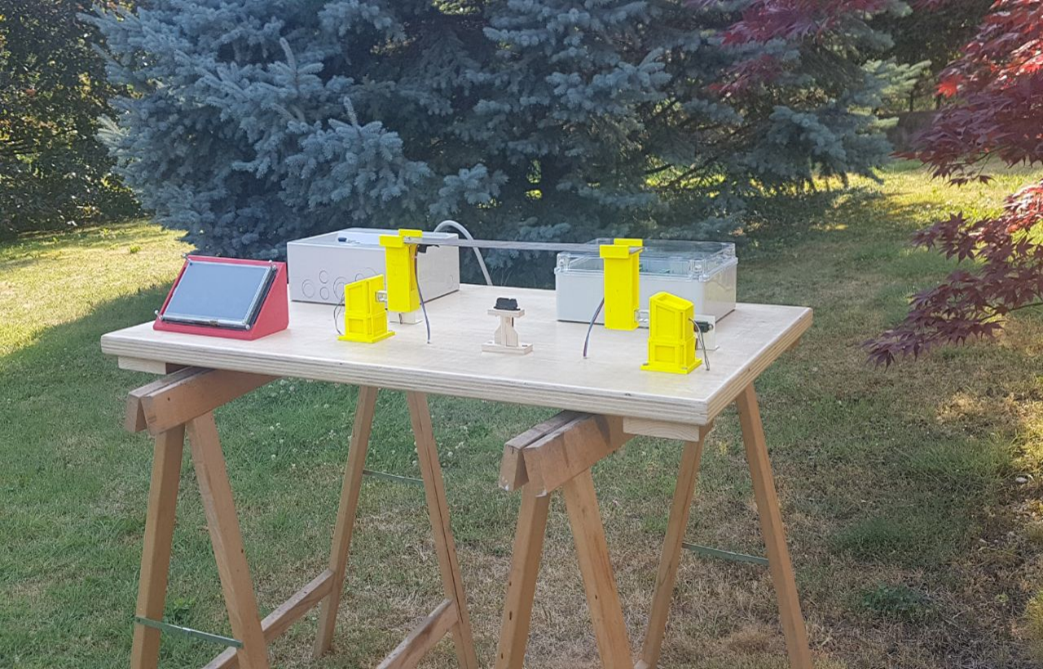
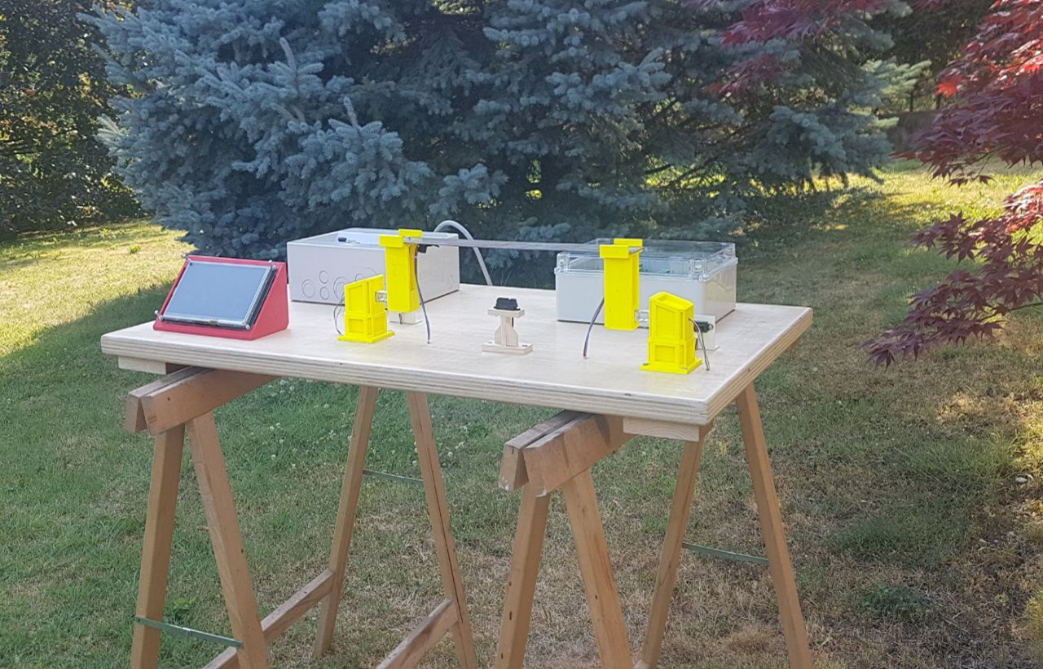
The Raspberry board: another device that has gained great notoriety in the field of IoT in recent years. Within the system, it acts as a client. The Arduino controller is connected to it and communicates with the server via an internet connection. It is a complete computer, equipped with a fair amount of power with a low cost. As for the interface accessible directly on site, the original idea involves the use of a touch LCD display, on which a browser with the pages of the local web application is displayed. The basic idea is to boot the operating system (a specific Linux distribution, called Raspbian) in Kiosk mode, i.e. displaying the browser in full screen, in order to limit the use only to the local application.
The serial port: The transmission channel between the Arduino controller and Raspberry is the serial port. Present on many electronic devices, among the most heterogeneous, it allows the sending of sequences of characters. They are then analyzed and converted into data.
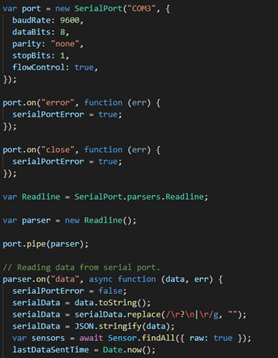
In the specific case of this project, sequences of characters that are strings representing JSON objects are sent. Within NodeJS (on the client) serial port management is done using the Serialport plugin. The door is configured and opened, after which a function waits for data to be transmitted. When this happens, they are analyzed and all the related functions are executed (they are sent on the socket to the server, it is checked if there are the conditions to generate an anomalous event, etc.). This then happens cyclically, based on the Arduino timer, which I set to 2 seconds. Data from the serial port is analyzed. If they are not valid, they are discarded. I have also created a function that periodically checks (every 4 seconds) the intervals of data transmission by the serial port. If these exceed 3 seconds (1 second margin with respect to the Arduino timer) a client failure event is generated, and specifically a failure of the serial port that communicates with the controller.
5. Critical reflections on the differences between development and production environments
The entire thesis project was built assuming that we are in a development environment. This implies having allowed myself (without lack of awareness) some technical lightness that would not be admissible in a production environment. Here are some considerations.
5.1. Safety
HTTPS instead of HTTP: a fundamental (and now trivial) requirement to ensure the security of communications between client and server, but also of the interface.
Socket authentication: another important element necessary for the security of socket communications would be to authenticate the latter. Cryptographic keys could be used, in order to avoid "man-in-the-middle" attacks and have the guarantee that the device that is transmitting the data is really the client and that the data is not tampered with in any way.
More secure generation of unique IDs: the IDs of the different entities involved in the application are generated through PostgreSQL (which in turn relies on external libraries integrated into it) with the UUIDV1 data type. This type of unique token is obtained by taking the MAC address of the host's network card and the time as "ingredients". However, as per the documentation, it is not recommended to use this type of UUID in security-sensitive applications, because it is possible to trace the MAC address. My choice was dictated in order to avoid collisions between tokens generated by different machines with certainty. However, in order not to expose sensitive data, I would use UUIDV3, which does not encode any host data.
Stricter state integrity checking: This measure, which is already partly implemented in the current version, is absolutely necessary to maintain consistency of information regarding the state of a client, both on the client and on the server. A practical example: an uncontrollable event such as an anomaly is generated at a time when the client fails to notify the server, it enters a state of inconsistency. For this reason, the client must periodically try to notify the server of its change in status. On the other hand, the server must periodically contact the client to be sure that it is reachable and working. If the server detects a connection failure with the client, it generates an alarm that is visible to users of the application, who can take action to re-establish the connection (and consequently the integrity of the state). You can also think of creating a sort of local buffer for events generated on the client while it can't reach the server, so that there is never a period of "darkness" about what happened. As soon as the conditions are met, the buffer is emptied on the server, which records the events definitively.
A second example: in the event that a certain command given by a user (such as the on-site reset of a client's alarm state) fails to reach the server, this command must not be executed, and the user must be warned of the error. So the general logic must follow the pattern: I wait for a response from the other party before completing an action. If the reception response is positive, I conclude, otherwise I cancel.
Handling all exceptions: When working on large projects, you may miss out on handling some exceptions. This, if in a development context is passable, in a production context must not happen, in order to ensure maximum solidity and functional stability. Another good practice is to manage errors by following a pattern, and also standardizing error messages (for example with keywords), so as to make the problem identifiable at a glance.
Deep testing: it may seem obvious, but carrying out structured, precise and in-depth testing is the basis of good software. In this specific case, in addition to ensuring the robustness of the software part, it also validates the cohesion between the latter and the hardware, a fundamental aspect in an IoT context.
5.2. Dedicated hardware:
Imagining that this system lands on the market, it is natural to imagine that instead of the Arduino controller and the Raspberry board, dedicated hardware is adopted. Beyond the realism of the data collected, the greatest advantage would be reliability in relation to cost. I can also imagine that different hardware would be needed in relation to the type of structure, the size and the criticality of the context.
6. Current and future developments
Mobile application for notifications:
One element that I will develop in the near future will be an application that, through services such as Google Firebase, sends real-time notifications on mobile devices, following authentication. This significantly improves the response time of system users, and also provides greater flexibility, since the system can alert operators or administrators in real time, without having to keep a browser open on a computer. At a later stage, the application could evolve into a control panel similar to the web interface, and thus offering a full range of features, rather than just providing push notifications.
SendGrid to send email notifications
Another notification channel used almost everywhere today is email. For this reason, I have already thought about implementing the sending of notification emails when relevant events are generated.
To implement this feature I thought of using the Node Sendgrid plugin, which allows a quick and relatively simple configuration with all major email providers.
Analysis of data on the use of public facilities
By installing photocells on a bridge that count the passage of vehicles, useful data could be collected over time on the actual use of the structure on an hourly, weekly, monthly and annual basis. When scheduling a new maintenance intervention, by entering the estimate of its duration, the system can suggest by analyzing the data on use through an algorithm which could be the best time to carry out the intervention, creating the least possible inconvenience for users.
Automatic Arduino Code Generation
To increase the ease of client configuration I thought it might be useful, when the client is first configured, to automatically generate the code for the Arduino controller. This operation would not be very complex, as the Arduino code is very small. Its dynamic generation would take place by analyzing the parameters such as name, type, number of PINs and quantity of sensors connected to a client indicated at the time of its setup. By concatenating predefined code strings to parameter values, you could get an .ino file ready to be compiled and loaded on the controller.
The feature would save a lot of time during installation. However, I am aware that this idea is linked to the use of the Arduino controller, and I would not be sure if I could implement it with other controllers.
Account "system manager"
In a real-world context, you would need to have one or more "service" accounts that allow you to create and manage organizations, administrator accounts, and all system maintenance features that do not affect the administrators and operators of the organizations.
Analysis of maintenance costs at the end of the estimate
Another useful development could be to provide maintenance budgets based on the analysis of the costs of previous interventions.
This would require a detailed compilation of each intervention, entering expense items and specifying the standard frequencies according to which they should be carried out.
Proceeding over time, the system could provide cost forecasts for the individual intervention as well as for a certain period of time, in an increasingly precise and reliable way.
-
Completion Date:
2021 -
Status:
Completed -
Location:
Trento, Italy